Results for {phrase} ({results_count} of {results_count_total})
Displaying {results_count} results of {results_count_total}

Original price was: $199.00.$3.99Current price is: $3.99.
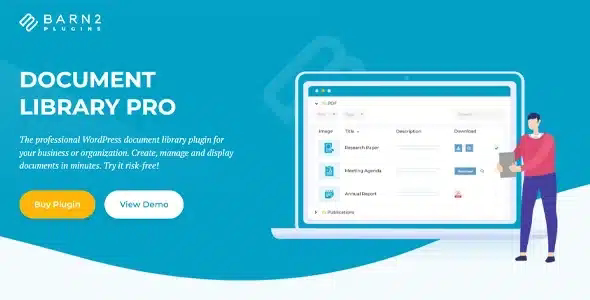
Document Library Pro is a document management and resource directory plugin for WordPress designed to organize, display, and deliver large volumes of downloadable files in searchable, filterable tables or grids. Built for corporate portals, educational institutions, manufacturers, and membership sites, it replaces static, manually maintained lists of links with a dynamic, centralized document repository where users can locate manuals, spec sheets, reports, and forms effortlessly.
Managing growing collections of PDFs, spreadsheets, manuals, and compliance documents using standard WordPress pages and the native Media Library creates severe maintenance friction. Administrators end up manually inserting links into static HTML tables, duplicating files across multiple pages, and spending hours hunting down outdated versions whenever a single document changes.
For visitors, navigating endless lists of unsearchable links leads to frustration and increased support inquiries. Document Library Pro resolves this by introducing a dedicated Documents custom post type paired with instant front-end filtering, keyword search, and automated file replacement—ensuring every public listing updates dynamically whenever a source file is edited in one central place.
Searchable & Filterable Front-End Layouts: Displays documents in customizable, responsive data tables or clean visual grids equipped with instant AJAX keyword search, category dropdowns, tag filters, and sortable columns.
Centralized Document Post Type & Versioning: Manages every file as a structured WordPress entry with custom metadata (e.g., file size, file type, publication date, author, version notes) so updating a file once automatically updates every list where it appears.
Flexible File Hosting & Delivery: Supports direct Media Library uploads, external cloud links (e.g., Google Drive, Dropbox, Amazon S3), embedded audio/video players, and multi-file ZIP downloads.
Instant Document Preview & Lightbox: Allows visitors to view PDFs, images, and supported files directly in an on-page modal preview before downloading.
Bulk Import & Front-End Submission: Import hundreds of existing Media Library files or CSV records in bulk, and optionally allow authorized users or staff to upload new documents via a front-end submission form.
Your team maintains multiple static pages filled with manual links or HTML tables to list PDFs, policies, or product datasheets.
Customers, students, or staff frequently email support asking where to find specific manuals or complaining about downloading outdated file versions.
Updating a single policy document or technical specification requires editing several pages across your website manually.
Your repository has grown to dozens or hundreds of files, requiring multi-criteria filtering by department, product family, language, or document type.
Document Library Pro delivers high value for corporate intranets, B2B distributor portals, industrial equipment manufacturers, educational academies, legal/compliance hubs, and municipal websites managing structured, searchable resource libraries.
Conversely, it is unnecessary for small brochure websites or personal blogs that only host two or three static PDF downloads (such as a single restaurant menu or price sheet), where standard Gutenberg file blocks or text links suffice.
Corporate & HR Portal Administrators: Teams publishing internal policies, onboarding forms, compliance guidelines, and employee handbooks segmented by department.
Manufacturers & Technical Suppliers: B2B businesses organizing product spec sheets, CAD files, safety data sheets (SDS), and installation manuals by model or series.
Educational & Training Institutions: Schools, universities, and online academies distributing syllabi, lecture notes, and study guides filtered by subject, instructor, or academic level.
Single-Source File Maintenance: Replacing an outdated PDF inside a document entry updates every directory table across the site automatically, eliminating broken links.
Superior Visitor Self-Service: Instant keyword search and multi-dropdown filters allow visitors to pinpoint exact documents in seconds without browsing multiple pages.
Reduced Support Overhead: Decreases inbound emails and calls from users struggling to locate current forms, manuals, or datasheets.
Significant Administrative Time Savings: Eliminates manual HTML table editing and streamlines large repository launches via bulk file and CSV import tools.
Structured Metadata Visibility: Displays file sizes, formats, publication dates, and custom fields cleanly alongside download buttons so users know exactly what they are downloading.
Within the WordPress ecosystem, Document Library Pro registers a dedicated custom post type (dlp_document) along with custom document categories, tags, and author taxonomies. It leverages your existing WordPress Media Library or external file URLs without altering core site architecture or active themes.
During daily operations, administrators upload files and assign taxonomies inside the Documents backend menu. On the front end, shortcodes or Gutenberg blocks render the searchable table or grid layout, querying the document entries dynamically and serving direct downloads or modal previews to visitors.
[ Admin Uploads File & Assigns Categories/Tags ]
 (Centralized Document Custom Post Type)
                     │
                     ▼
[ Document Library Pro Query & Layout Engine ]
 (Table View / Grid View + Search & Filters)
                     │
     ┌───────────────┴───────────────┐
     ▼                               ▼
[ Instant Keyword & Filter ]  [ Modal Preview / Direct Download ]
B2B Technical Specification Hub: Allowing engineers and distributors to filter hundreds of product manuals, certifications, and safety sheets by product line and document type.
Corporate Governance & Policy Directory: Providing employees or clients with a categorized table of legal agreements, HR forms, and financial reports with visible publication dates.
Academic Course Resource Library: Organizing downloadable study guides, worksheets, and reference readings filtered by course module, semester, and difficulty level.
Document Library Pro supports all standard file formats allowed by WordPress—including PDFs, Word documents, Excel spreadsheets, PowerPoint presentations, ZIP archives, images, and audio/video files—as well as external links to files hosted on Google Drive, Dropbox, or AWS.
Because each document is stored as a centralized entry rather than hardcoded page links, you simply replace the attached file inside that single document entry. Every table or grid displaying that document across your site immediately serves the updated file.
Yes. Using shortcode parameters or Gutenberg block settings, you can output filtered libraries showing only specific categories, tags, or authors on separate pages (e.g., one library for HR policies and another for Marketing assets).
Yes. Document Library Pro includes a built-in preview option that opens PDFs and supported media files in a clean on-page lightbox modal so visitors can inspect content before saving the file.
Document Library Pro transforms unstructured collections of WordPress files into an organized, searchable resource repository. By replacing fragile manual link lists with a centralized document post type, instant faceted filtering, and single-point file updates, it streamlines administrative maintenance and enables visitors, students, and clients to find exact files effortlessly.
If you want to know more about the GNU / GPL license, click here. For contact us, visit our support page or click here.
We do not offer any additional services of the author, such as customization of products or license keys. We are not affiliated with or related in any way to third-party developers or trademark owners.